




Description
Features
Free Features:
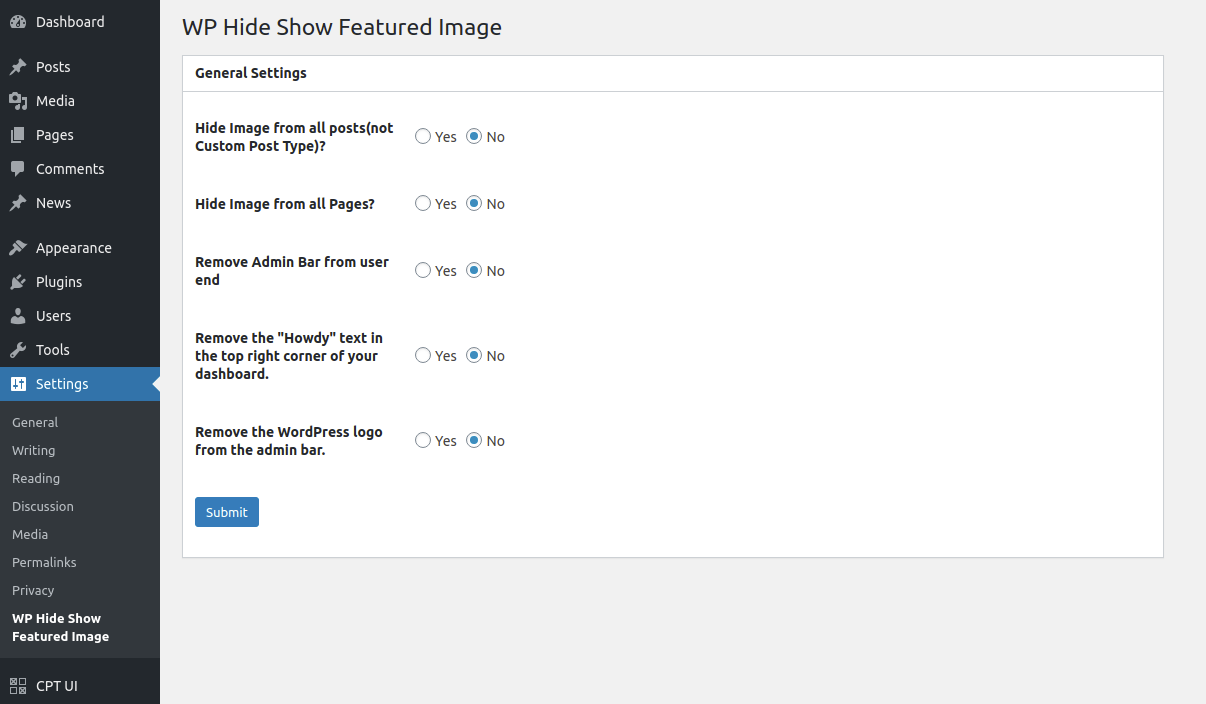
– Hide featured images globally from all posts and pages
– Hide Admin Toolbar on the front-end for all users
– Remove the “Howdy” greeting from the top-right admin bar
– Remove the WordPress logo from the top-left admin toolbar
Explore more here:
Documentation
Support
Pro Features:
– Device-specific control: hide/show featured images on desktop or mobile
– Per-post and per-page visibility management
– Hide the admin toolbar based on user roles
– Compatible with custom post types
Upgrade to Pro
Unlock powerful customization with the Pro version:
– Show/hide featured images based on device (desktop & mobile)
– Control featured image visibility on each individual post or page
– Hide admin toolbar based on specific user roles
– Priority support and regular feature updates
Important: If you have the free version of WP Hide Show Featured Image installed, please deactivate and delete it before installing the Pro version.
If your theme uses a custom method to display the featured image, this plugin may not function as expected. For best compatibility, ensure that your theme uses standard WordPress functions to display featured images.
Please note that the plugin is currently not compatible with the Image widget in page builders like Elementor, Divi Builder, WPBakery, or similar, when used to dynamically display the featured image.
Reviews
There are no reviews yet.